Events Dashboard
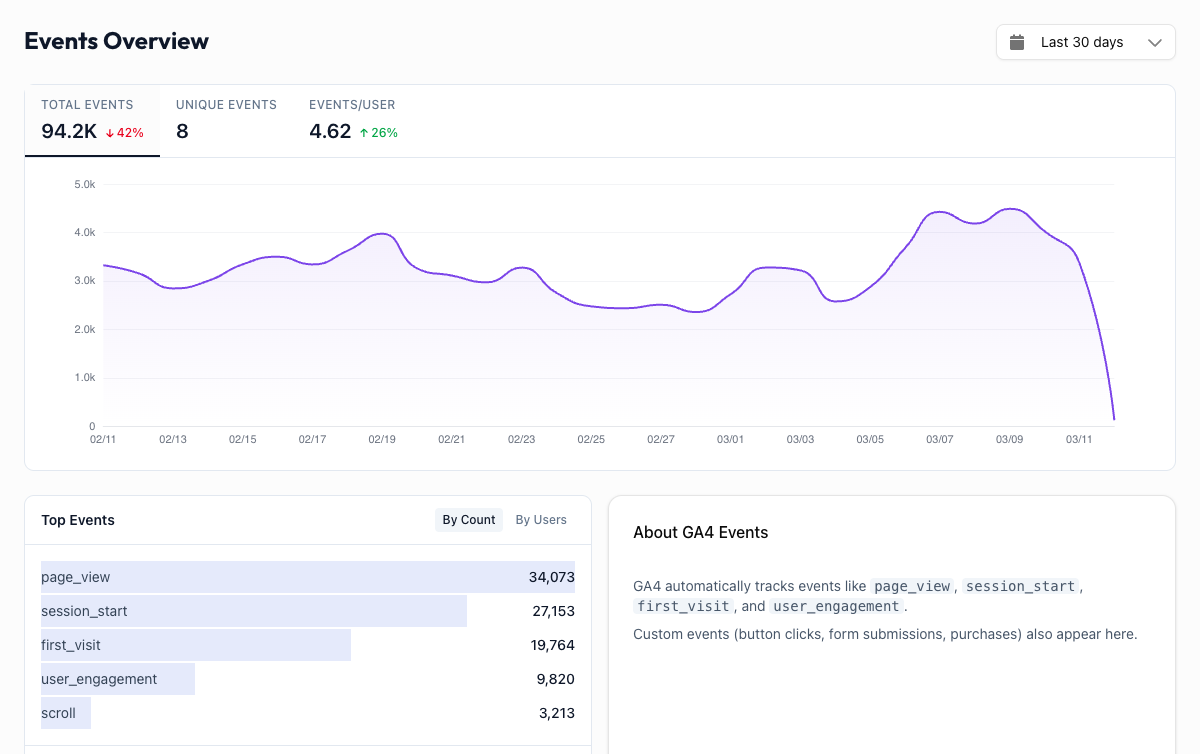
The Events dashboard shows you every tracked interaction on your website beyond simple page loads: button clicks, form submissions, video plays, file downloads, scroll depth, and more.
If pageviews tell you where people go, events tell you what they do when they get there.
What Are Events?#
In GA4, everything is an event. Even a page load is tracked as an event called page_view. This is different from older versions of Google Analytics, where events were a separate concept.
An event is any interaction you want to measure. Some events are collected automatically by GA4. Others you can set up yourself (or your developer can) to track the specific actions that matter to your business.
Overview#
At the top of the Events dashboard, you see your most-triggered events ranked by count, along with a trend chart showing how event volume changes over time.
This gives you a quick pulse on user activity. A sudden spike in click events after launching a new CTA? That's a good sign. A drop in form_start events after a redesign? Worth investigating.
All Events#
The All Events table gives you the full picture. For each event, you see:
- Event Count: how many times this event was triggered
- Users: how many unique visitors triggered it
- Events per User: average number of times each visitor triggers this event
Sorting by "Events per User" can reveal interesting patterns. If a small group of users triggers a particular event far more than average, you may have found your power users, or possibly a UI element that's frustrating people into repeated clicks.
Common GA4 Events#
GA4 automatically collects several events without any setup on your part. Here are the ones you'll see most often:
| Event | What it means |
|---|---|
page_view | Someone loaded a page on your site. |
session_start | A new session began. This fires once per visit. |
first_visit | A brand-new visitor arrived for the very first time. |
scroll | A visitor scrolled to 90% of the page depth. If this number is low compared to your page_view count, people may not be reading your content. |
click | A visitor clicked an outbound link (a link pointing to a different website). |
If you see events beyond these (like sign_up, purchase, or custom names specific to your business), those were configured in your GA4 property or added through Google Tag Manager.
Know what you're tracking
Events are only useful if you know what they mean. If you see custom events you don't recognize, check your GA4 property's event configuration in the Google Analytics admin panel. Tracking events you can't interpret is just noise.
Making Events Actionable#
The most valuable events to watch are the ones tied directly to your business goals:
- Lead generation sites: Track
form_startandform_submitevents. A big gap between the two means your form is losing people. - E-commerce: Watch
add_to_cart,begin_checkout, andpurchaseevents to find your conversion funnel drop-offs. - Content sites: Monitor
scrollevents relative topage_viewto gauge whether people actually read your articles. - SaaS: Track feature-specific events to understand which parts of your product get used and which get ignored.
If you're not sure which events to focus on, start with first_visit and session_start to understand your traffic, then work your way toward the events closest to revenue.